 Gabri
Gabri
A temporary HWID spoofer changes the hardware ID values your PC reports until the next restart. A permanent spoofer, or perm spoofer, rewrites those IDs where they're stored, in the motherboard's firmware or on the drive, so the change survives a reboot. One edits the answer and the other edits the source, and that single difference decides how long a spoof lasts, what can break and how you undo it.
The choice carries the most weight on Riot Vanguard. Riot's Vanguard support page, updated June 2, 2026, describes Vanguard as a client plus a kernel mode driver and calls it "usually an on-boot application." Vanguard may also require 4 Windows security features before a game will launch, TPM 2.0 among them.
Temp vs Perm Spoofer: What's the Difference?
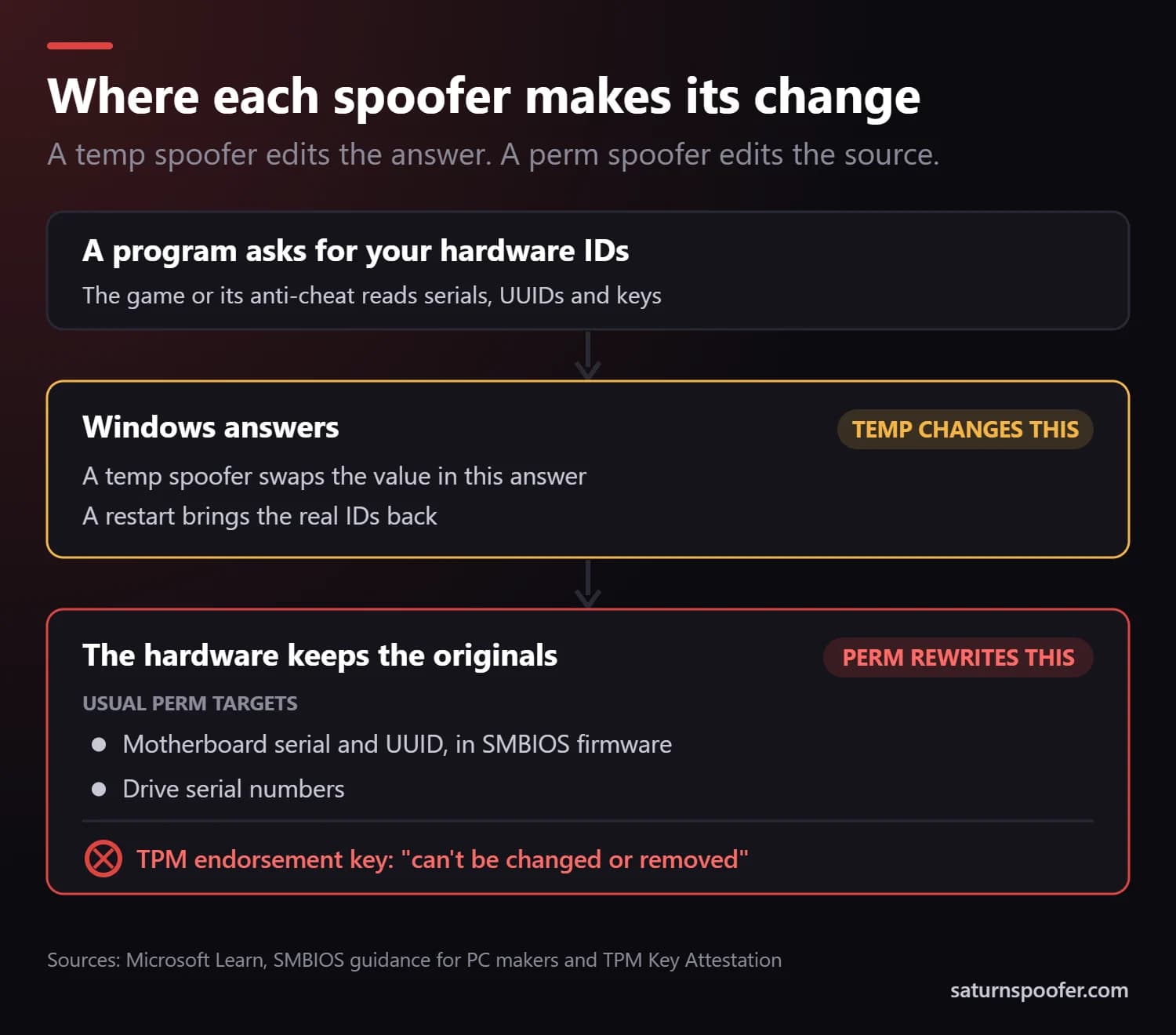
The difference between a temp spoofer and a perm spoofer is where the change happens: a temp spoofer alters the answer Windows gives when a program asks for your hardware IDs, and a perm spoofer alters the stored value behind that answer. The rest follows from that:
| What differs | Temp spoofer | Perm spoofer |
|---|---|---|
| What it changes | The IDs Windows reports | The IDs stored in firmware or on drives |
| Lasts until | The next restart | Someone rewrites them |
| When it runs | Before every session | Once |
| If a step fails | A restart clears it | The PC may not boot |
| How to undo it | Restart | Write the originals back |
What Is a Temp Spoofer?
A temp spoofer, short for temporary HWID spoofer, is a program that intercepts requests for your hardware IDs and returns substitute values until Windows restarts. Most use a kernel driver to do it. Nothing is written to the components, so a restart brings the real serials back, which is how HWID spoofers work in their temporary form.
Windows already keeps this split for one identifier. Microsoft's network driver documentation defines two MAC addresses for an Ethernet adapter: a permanent address "encoded in the hardware" and a current address, the one the adapter "is currently using," set as a configuration parameter. A temp spoofer does the same for the rest of the list, changing the reported value and leaving the stored one alone.
The catch is routine: a temp spoofer has to be running before anything reads your IDs, after every restart, and one skipped session shows the game your real serials.
What Is a Perm Spoofer?
A perm spoofer, short for permanent HWID spoofer, is a tool that overwrites your identifiers where they're kept, so the new values load on every boot without the tool running. The usual targets are the motherboard's serial number and UUID, held in its SMBIOS firmware tables, and your drive serials.
Those are values a manufacturer normally sets. Microsoft's SMBIOS guidance for PC makers says the fields get filled in "using tools provided by BIOS/Firmware vendors," and describes the system UUID as a value "intended to be associated with this specific machine." A perm spoofer rewrites those fields after the PC leaves the factory.
Some identifiers are out of reach. Microsoft's TPM key attestation guide says the endorsement key inside a TPM is injected at manufacturing time, is unique to each chip and "can't be changed or removed." No perm spoofer rewrites that key. With a TPM, the most any spoofer can change is what gets reported about it.
What Does "Permanent" Mean on a Spoofer?
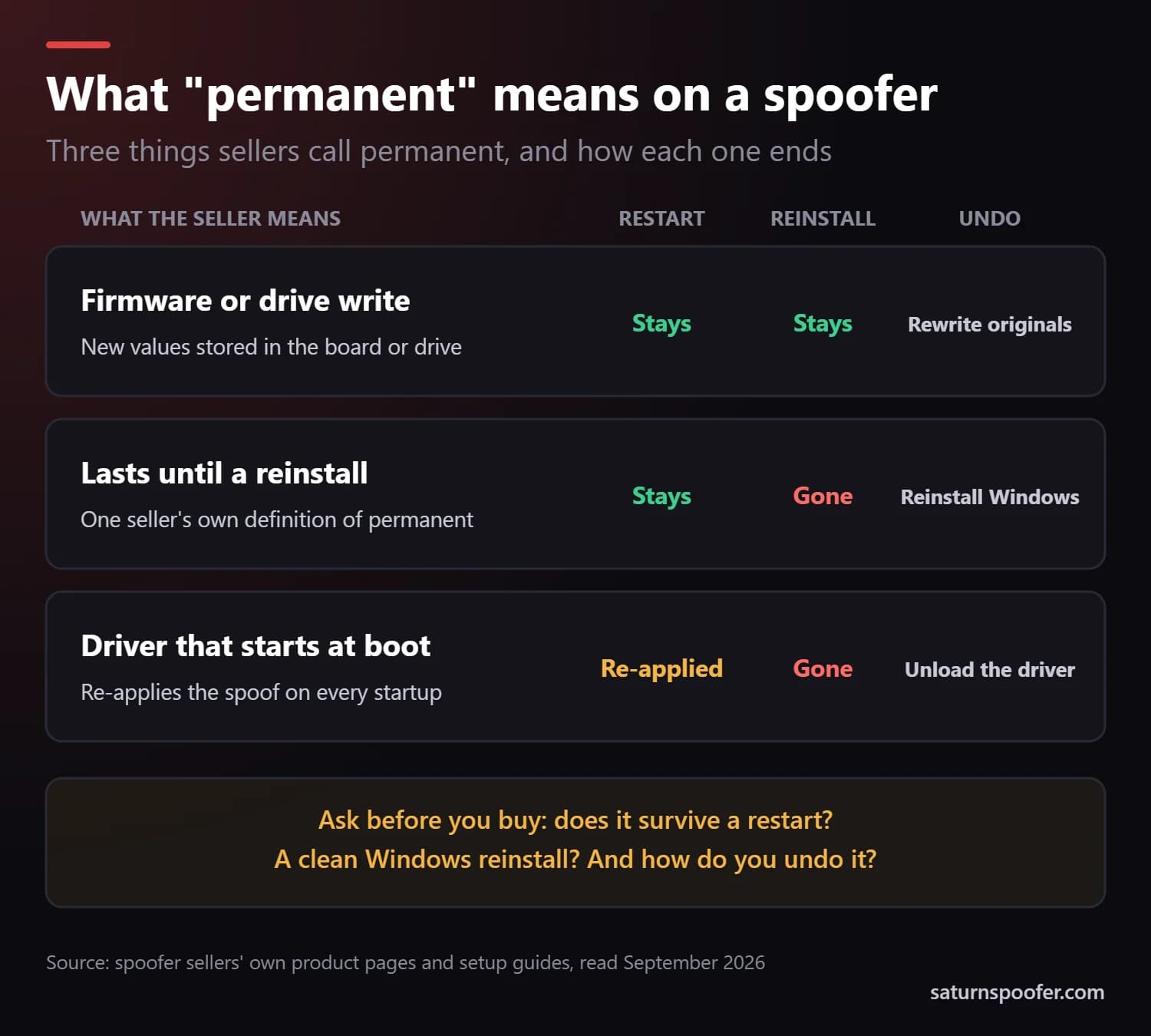
On a spoofer, "permanent" can mean three different things, and product pages rarely say which. We read how several sellers describe their perm products in September 2026 and found all three:
- A firmware or drive write. New values go into the SMBIOS tables or the drive, so they survive restarts and a clean Windows install. Undoing it means writing the originals back, if anyone saved them.
- A change that lasts until Windows is reinstalled. One seller describes its permanent spoofer in those terms. A fresh install brings the real IDs back.
- A driver that loads at every startup. Another seller's documentation describes a "permanent" spoofer that changes the IDs on every boot and can be unloaded to restore the real ones. That's a temp spoofer that starts itself.
Before you pay for anything sold as permanent, ask the seller three questions. Call it the reboot, reinstall and undo test:
- Does the spoof survive a restart without the tool running?
- Does it survive a clean Windows reinstall?
- How do you get your original IDs back, and does the tool save them before it writes anything?
If a seller can't answer all three, you're buying a label.
Don't confuse any of this with a permanent ban, which is a Riot penalty on an account. By default a Valorant HWID ban has an end date.
Is a Perm Spoofer Riskier Than a Temp Spoofer?
Yes. A perm spoofer puts the hardware itself at risk because it writes to firmware and storage, while a temp spoofer's risks come from running every session. On the perm side:
- A failed write can stop the PC from booting. ASUS's EZ Flash 3 guide tells owners not to shut down or reset during a BIOS update "to avoid system boot failure," and a spoofer writing to board firmware runs the same risk.
- Windows may ask to be activated again. Microsoft says the Windows 11 digital license associates itself with your device's hardware, and a significant change such as a new motherboard means reactivating. A rewritten board identity can look like one.
A temp spoofer never touches the hardware, but it has to load before the game after every boot. It also adds a kernel driver to Windows, and some sellers' setup guides tell buyers to switch off Microsoft Defender first, which strips a layer of protection from the whole PC.
Both types share the biggest risk. Anti-cheats update, so a method that passes this month can be caught the next.
Temp or Perm Spoofer for Valorant?
On Valorant, the spoofer type matters less than two facts about Riot Vanguard: it usually starts with Windows, and it checks the security features that decide what may load. Riot's Vanguard security requirements page, updated May 31, 2026, lists four it may require before a game launches:
- TPM 2.0, the chip whose endorsement key no tool can rewrite.
- Secure Boot, which helps stop unauthorized software from loading at startup.
- Memory Integrity, which uses virtualization-based security to guard Windows "from malicious code and drivers."
- IOMMU, hardware protection for how devices reach memory.
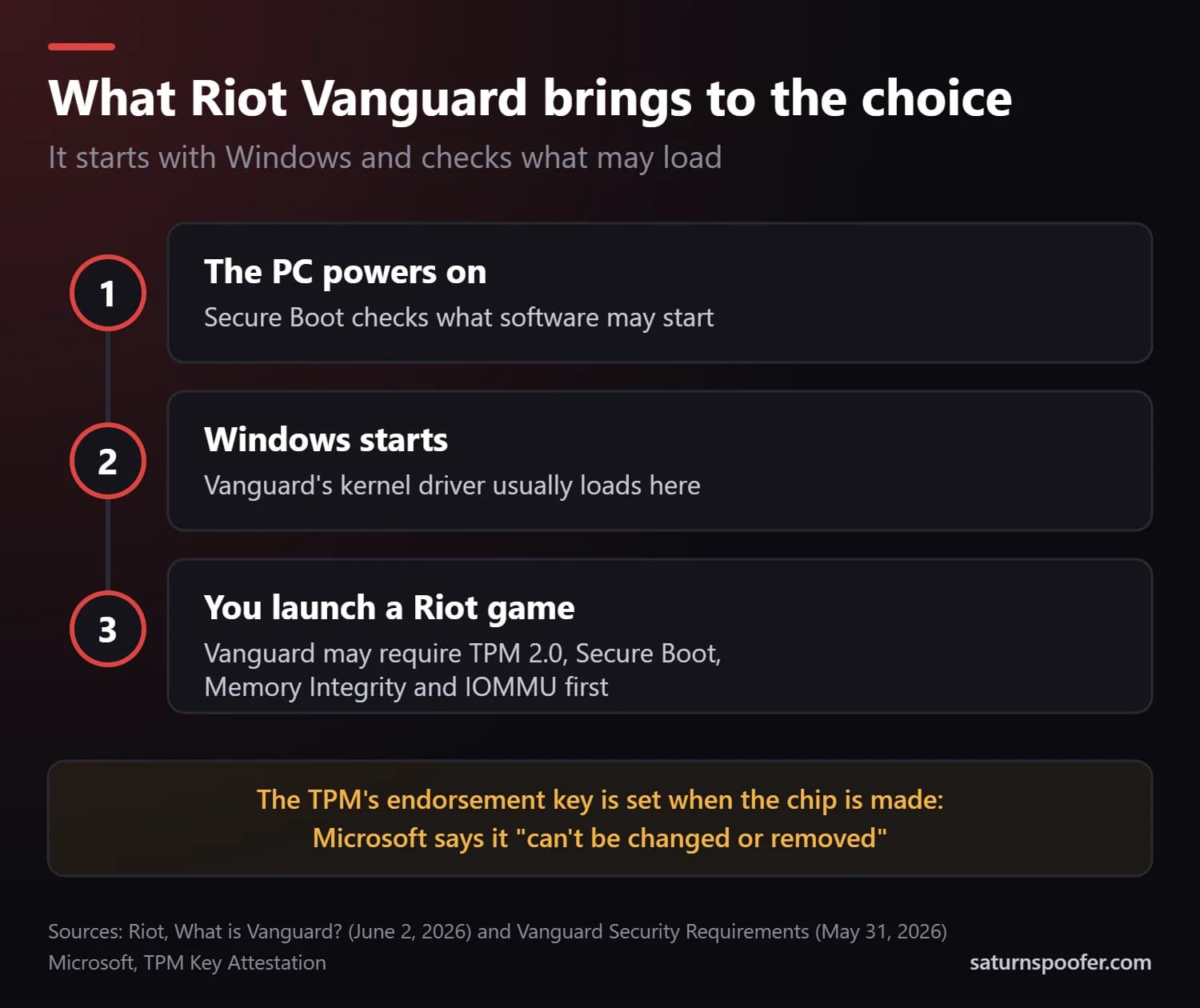
Each type meets Vanguard differently. A temp spoofer's substitutes have to be in place before Vanguard reads your IDs, and its driver has to load with those protections on, since switching them off can stop Vanguard from letting the game start. A perm spoofer's values are already in firmware at power-on, but it can't touch the TPM's key either. League of Legends runs on Riot Vanguard too, so the same applies to a League of Legends HWID ban.
None of this changes the ban itself. Riot's list of VALORANT error codes says the hardware ban behind error VAN 152 typically lasts 4 months, and Riot's HWID ban article says that while the ban runs, Riot will "regularly search for Riot account activity" by the banned player and ban any account it finds.
Does a Temp or Perm Spoofer Remove an HWID Ban?
No. Neither a temp nor a perm spoofer removes an HWID ban, because Riot keeps the ban on its own side. A spoofer only changes what the PC reports, so Riot's record stands and accounts it already banned stay banned.
Three more things hold whichever type you pick:
- It's against Riot's rules. Section 7 of Riot's Terms of Service, in the version dated December 1, 2024, lists "avoiding, bypassing, removing, deactivating" Riot's access protections among the things players must not do.
- A VPN adds nothing. Riot's penalties target accounts and PCs, and a VPN only changes your IP address.
- A review comes first. If the ban was a mistake, a Valorant ban appeal is the route that can lift it.
Hardware bans aren't limited to Riot's games, and an HWID ban from another publisher follows that publisher's own rules.
Which Should You Choose?
Choose a temp spoofer if you want nothing written to your hardware and can run it before every session. Consider a perm spoofer only if you accept the firmware risk and the seller passes the reboot, reinstall and undo test.
A temp spoofer fits if:
- You want your real IDs back after every restart.
- The PC is shared, so a lasting change would affect other people too.
- You'd rather fix a mistake by restarting than by rewriting firmware.
A perm spoofer fits only if:
- You know what it writes, and where.
- It saves your original values before it changes anything.
- You can live with reactivating Windows, or with a board that won't boot if a write fails.
Whichever you choose, compare its coverage list with what your anti-cheat reads. Saturn, an HWID spoofer for Windows, spoofs the identifiers for the motherboard, CPU, RAM serials, TPM, GPU, monitor and EDID, USB devices, the MAC address, and NVMe, SSD and HDD drives. It ships as a single loader, and the license you buy sets which anti-cheat systems it handles. Signing up for the 24-hour free trial takes an email but no card.
Perm vs Temp Spoofer FAQ
Do you have to spoof again after every restart?
With a temp spoofer, yes. A restart brings your real IDs back, so the spoofer has to run again before you launch the game. A perm spoofer that writes to firmware doesn't, and the kind that loads at startup re-applies itself.
Does a perm spoofer survive a Windows reinstall?
Only if it writes to firmware or the drives. The motherboard's SMBIOS values sit outside Windows, so a reinstall leaves them alone, but a perm tool that lives inside Windows ends with the reinstall.
Can a perm spoofer brick your PC?
It can. An interrupted or faulty firmware write can leave a motherboard unable to boot, which is why ASUS warns against shutting down mid-update. A temp spoofer writes nothing to the hardware, so a restart undoes it.
Can a spoofer change your TPM?
A spoofer can change what's reported about a TPM, but no tool can rewrite its endorsement key, which Microsoft says is set during manufacturing and can't be changed or removed. That matters on Valorant, where Riot Vanguard may require TPM 2.0.
Is a lifetime license the same as a perm spoofer?
No. A lifetime license decides how long you can use the software, while "perm" describes what the spoof does to your hardware. Either type can be sold with a lifetime license or with one that runs out.